


Applicability
This article applies to: Gate Web platform
Preparation before operation: Contract trading account has been activated, and you hold a contract position
Estimated time required: 3 minutes
Objective
This article will guide you through setting up and managing trailing orders and trailing take-profit orders on the Gate Web platform.
Steps
Step 1: Submit a Trailing Order
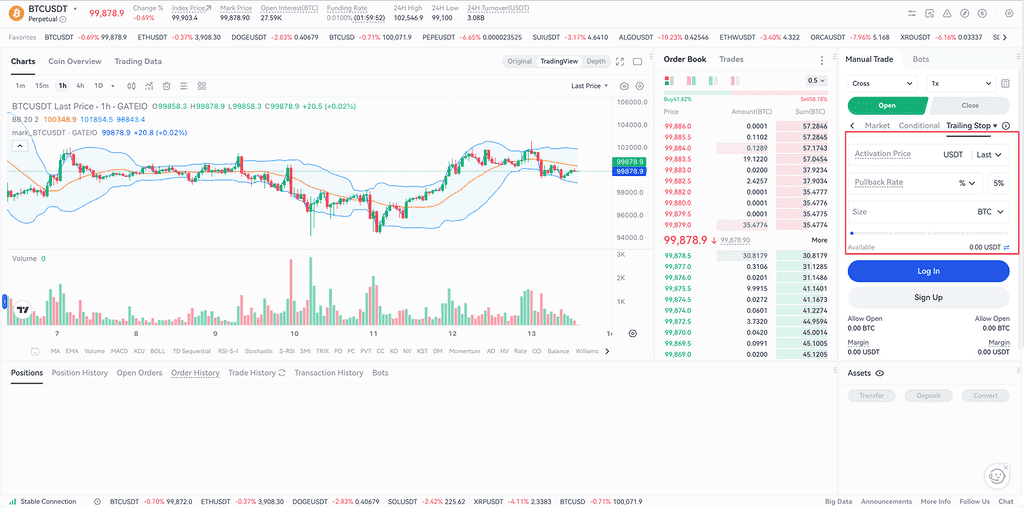
- On the contract trading page, switch the order type to Trailing Order to display the order input form.
- Fill in the two required parameters: Callback Rate and Quantity.
- (Optional) Set the Activation Price. If you do not set an activation price, the trailing order will activate immediately after submission.
- After confirming all information is correct, click Submit Order.
Parameter Description:
| Parameter | Description | Notes |
|---|---|---|
| Callback Rate (Required) | The callback rate is the main condition for calculating the actual trigger price. You can set it as a "percentage" or "price difference." The actual trigger price is determined based on the historical highest/lowest price and the callback rate. | Percentage Setting: If the historical high is 50,000 USDT and the callback rate is 5%, the trigger price is 50,000 x (1-5%) = 47,500 USDT. Price Difference Setting: If the historical high is 50,000 USDT and the price difference is 5,000 USDT, the trigger price is 50,000 - 5,000 = 45,000 USDT. |
| Quantity (Required) | The quantity set for the trailing order, which is also the quantity of the market order triggered after the trailing order is activated. | N/A |
| Activation Price (Optional) | The activation price is one of the conditions for triggering the trailing order. When the latest price/mark price/index price reaches or exceeds the activation price (default is the latest price), the order will be activated. After activation, the system begins calculating the actual trigger price for the trailing order. | If no activation price is specified, the order will activate immediately after submission. |
Step 2: Submit a Trailing Take-Profit Order
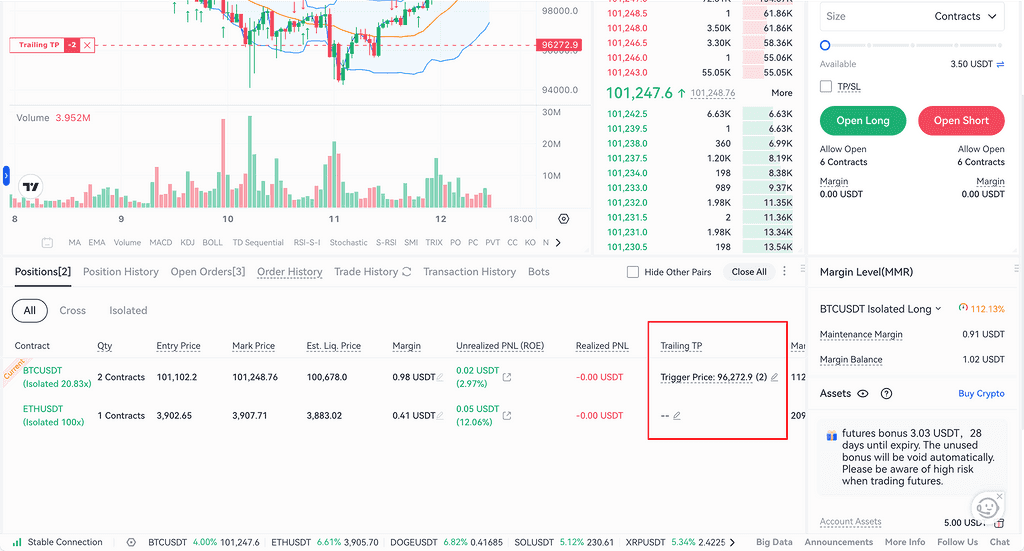
- In the Positions area, click Take Profit/Stop Loss.
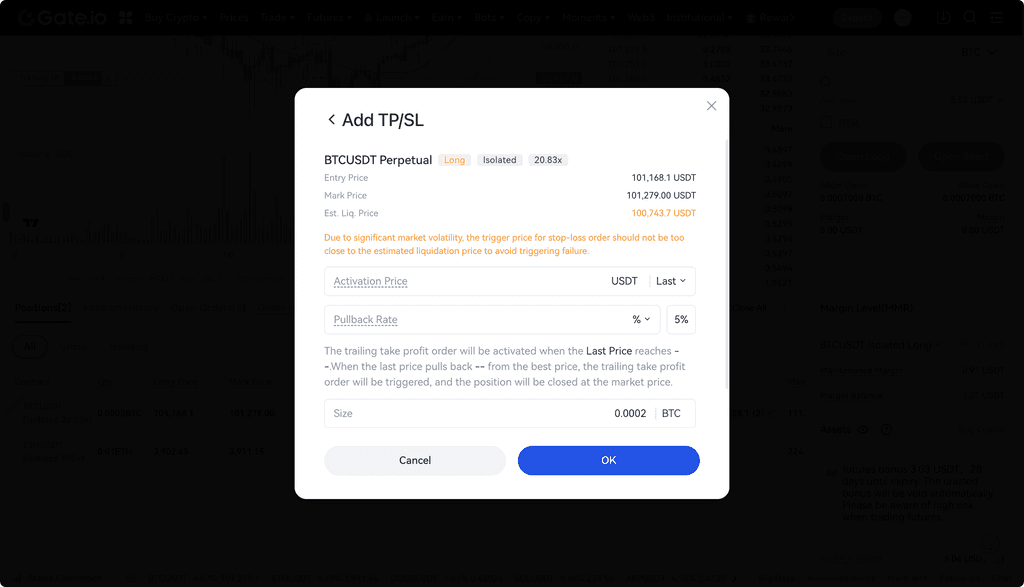
- Switch to the Trailing Take-Profit tab to enter the order input page.
- Fill in the two required parameters: Callback Rate and Quantity.
- (Optional) Set the Activation Price. If you do not set an activation price, the trailing take-profit order will activate immediately after submission.
- After confirming all information is correct, click Submit Order.
Step 3: View/Edit Trailing Orders
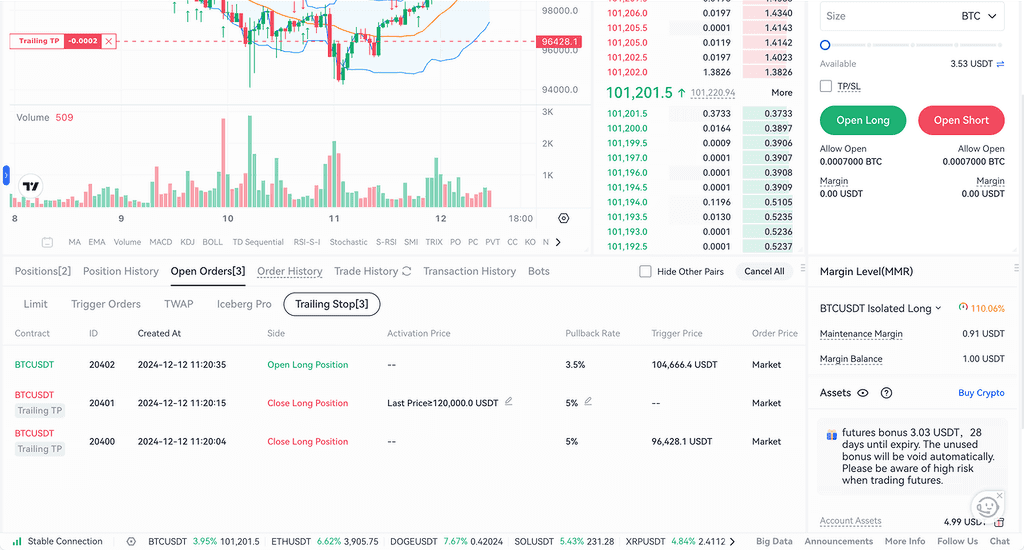
- In Current Orders, select the order type Trailing Order to view all submitted trailing orders.
- Click the edit icon to edit trailing orders with the status "Pending Activation."
- Orders with the status "In Progress" are actively tracking market fluctuations and cannot be edited at this time.
Step 4: Cancel Trailing Orders
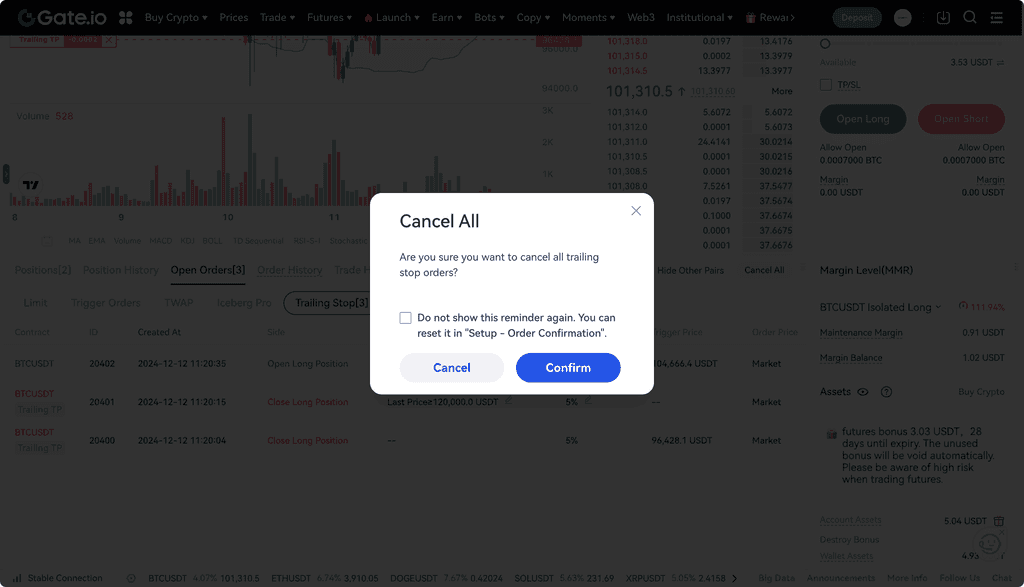
On the Trailing Order page, click the Cancel button to cancel a single order, or click Cancel All to cancel all trailing orders or trailing take-profit orders.
Notes
- When using trailing take-profit to close a position, carefully calculate the activation price and callback rate to ensure the trailing take-profit order is a profitable closing order upon activation. This allows the trailing take-profit to track market fluctuations and automatically adjust the trigger price, helping you lock in more profit.
- For long positions, the trailing take-profit order will be a market sell order. The activation price you set must be higher than the average entry price or the latest price of the position.
- For short positions, the trailing take-profit order will be a market buy order. The activation price you set must be lower than the average entry price or the latest price of the position.
- Once a trailing order is activated, the system will automatically adjust the trigger price based on market fluctuations until the order is triggered or manually canceled.
- Gate reserves the final interpretation rights for the product.
Frequently Asked Questions
Q1: What is a trailing order?
A: A trailing order is a type of smart order that automatically adjusts the trigger price based on market price fluctuations. When the market price moves in a favorable direction, the trigger price adjusts accordingly; when the market price reverses and reaches the set callback rate, the order will be triggered and executed.
Q2: What is the difference between activation price and trigger price?
A: The activation price is the condition for the order to start tracking the market. When the market price reaches the activation price, the order enters the "In Progress" status. The trigger price is the actual execution price of the order, dynamically calculated based on the historical highest/lowest price and the callback rate.
Q3: Why can’t I edit my trailing order?
A: Only orders with the status "Pending Activation" can be edited. Orders with the status "In Progress" are actively tracking market fluctuations, and the system is dynamically calculating the trigger price, so they cannot be edited at this time. To make changes, please cancel the order first and then resubmit.
Q4: If I need more help, how can I contact customer support?
A: Please visit the official Gate support page or contact our customer support team for further assistance.
Disclaimer
The content provided herein is for reference and educational purposes only and does not constitute any financial, investment, trading, or legal advice, nor does it constitute an offer or solicitation to buy or sell any digital assets. Gate makes no express or implied representations or warranties regarding the accuracy, completeness, or timeliness of the information contained herein. Product features, interfaces, rules, and fee structures may be updated or adjusted at any time. Please refer to the latest announcements and the actual information displayed on the Gate platform for the most accurate details.
Digital asset investments involve significant risk, and prices may fluctuate substantially. You may lose the entire amount of your investment. Please make decisions cautiously based on your own financial situation and risk tolerance after fully understanding the associated risks. If necessary, you are advised to consult an independent professional financial or legal advisor.
For more information about potential risks, please refer to Gate's Risk Disclosure and User Agreement.
